Saturday, August 20, 2011

ENetwork Chapter 3

1   
What is the purpose of resource records in DNS?

  •     used by the server to resolve names

   
2   
What are two forms of application layer software? (Choose two.)

  •     applications
  •     services

   
3  


Refer to the exhibit. What is the destination port for the communication that is represented on line 5?

  •     80

   
4   
What are two characteristics of peer-to-peer networks? (Choose two.)

  •     decentralized resources
  •     resource sharing without a dedicated server


5   
What is the automated service that matches resource names with the required IP address?

  •     DNS

   
6   
What three protocols operate at the Application layer of the OSI model? (Choose three.)

  •     DNS
  •     SMTP
  •     POP

   
7   
What are three properties of peer-to-peer applications? (Choose three.)

  •     acts as both a client and server within the same communication
  •     hybrid mode includes a centralized directory of files
  •     can be used in client-server networks

   
8   
Which application layer protocols correctly match a corresponding function? (Choose two.)

  •     HTTP transfers data from a web server to a client
  •     Telnet provides a virtual connection for remote access


9   
A small home network has been installed to interconnect three computers together for gaming and file sharing. What two properties represent this network type? (Choose two.)

  •     Security is difficult to enforce.
  •     A computer that responds to a file sharing request is functioning as a server.


10   
As compared to SSH, what is the primary disadvantage of telnet?

  •     does not support encryption

   
11   
Which statements are correct concerning the role of the MTA in handling email? (Choose three.)

  •     receives email from the client's MUA
  •     passes email to the MDA for final delivery
  •     uses SMTP to route email between servers

   
12   
Which two protocols are used to control the transfer of web resources from a web server to a client browser? (Choose two.)

  •     HTTP
  •     HTTPS

   
13   
What application layer protocol is commonly used to support for file transfers between a client and a server?

  •     FTP

   
14   
Which layer of the OSI model supplies services that allow user to interface with the network?

  •     application

   
15   
A network administrator is designing a network for a new branch office of twenty-five users. What are the advantages of using a client-server model? (Choose two.)

  •     centralized administration
  •     security is easier to enforce

   
16   
Which email components are used to forward mail between servers? (Choose two.)

  •     MTA
  •     SMTP

   
17   
What application layer protocol describes the services that are used for file sharing in Microsoft networks?

  •     SMB

   
18   
What are two characteristics of clients in data networks? (Choose two.)

  •     initiate data exchanges
  •     may upload data to servers

   
19   
What is the role of the OSI application layer?

  •     provides the interface between the applications on either end of the network


20   
How does the application layer on a server usually process multiple client request for services?

  •     uses support from lower layer functions to distinguish between connections to the service


ENetwork Chapter 2

1   
Which three statements best describe a Local Area Network (LAN)? (Choose three.)
  •     A LAN is usually in a single geographical area.
  •     The network is administered by a single organization.
  •     A LAN provides network services and access to applications for users within a common organization.
   
2   
What are two functions of encapsulation? (Choose two.)
  •     identifies pieces of data as part of the same communication
  •     ensures that data pieces can be directed to the correct receiving end device

3   
What is a primary function of the trailer information added by the data link layer encapsulation?
  •     supports error detection
   
4   


Refer to the exhibit. "Cell A" at IP address 10.0.0.34 has established an IP session with "IP Phone 1" at IP address 172.16.1.103. Based upon the graphic, which device type best describes the function of wireless device "Cell A?"
  •     an end device
   
5   


Refer to the exhibit. Which three labels correctly identify the network types for the network segments that are shown? (Choose three.)

6   
Which two layers of the OSI model have the same functions as the TCP/IP model Network Access Layer? (Choose two.)
  •     Physical
  •     Data Link
   
7   
What is the purpose of the TCP/IP Network Access layer?
  •     the division of segments into packets

8   


Refer to the exhibit. Which networking term describes the data interleaving process represented in the graphic?
  •     multiplexing
   
9   
What can be identified by examining the network layer header?
  •     the destination host address
   
10   
Select the statements that are correct concerning network protocols. (Choose three.)
  •     define the structure of layer specific PDU's
  •     outline the functions necessary for communications between layers
  •     require layer dependent encapsulations
11   


Refer to the exhibit. Which term correctly identifies the device type that is included in the area B?
  •    intermediary

12   
Which statements correctly identify the role of intermediary devices in the network? (Choose three.)
  •     determine pathways for data
  •     retime and retransmit data signals
  •     manage data flows
   
13   


Refer to the exhibit. What type of network is shown?
  •     LAN
   
14   
What is the primary purpose of Layer 4 port assignment?
  •     to identify the processes or services that are communicating within the end devices

15   
During the encapsulation process, what occurs at the data link layer?
  •     The physical address is added.
   
16   
What is the proper order of the layers of the OSI model from the highest layer to the lowest layer?
  •     application, presentation, session, transport, network, data link, physical
   
17   


Refer to the exhibit. Which set of devices contains only end devices?
  •     E, F, H, I, J

18   
What is a PDU?
  •     a layer specific encapsulation

19   
Which layer encapsulates the segment into packets?
  •     network
   
20   
Which characteristic correctly refers to end devices in a network?
  •     originate data flow

21   
What device is considered an intermediary device?
  •     switch

Sunday, July 24, 2011

Tips n’Trik Menghilangkan Tanda ShortCut di Desktop

Ini memang trik lama, bagi pecinta kerapian mungkin cara ini bisa sedikit membantu. Dengan cara ini anda dapat menghilangkan tanda shortcut “” di desktop anda. Jadi tampilannya desktop anda lebih bersih dari biasanya. Untuk Windows XP, sudah saya coba dan berhasil, cara nya:
  1. Masuk ke “START”-“RUN”-tulis “REGEDIT” 
  2. Lalu ke HKEY_CLASS_ROOT dan cari folder lnkfile (L kecil) bukan inkfile  
  3. Rename IsShortcut menjadi IsShortcuts (ada tambahan s)   
 
  4. Logg Off/Restart
    SELAMAT MENCOBA ^_^

    Thursday, June 23, 2011

    KONFIGURASI DNS SERVER pada DEBIAN-5

    1. Buka terminal dan masuk sebagai root atau super user dengan cara ketik su pada terminal dan masukkan password super user atau root.
    2. Masukkan DVD Debian 5 kemudian tentukan resource penginstalan dengan perintah : apt-cdrom add.
    3. Install paket bind9 dengan mengetikkan perintah : apt-get install bind9, seperti gambar 1.
    4. Gambar 1
    5. Backup file named.conf pada direktori /etc/bind/ menjadi file named.conf.bak pada direktori yang sama dengan perintah : cp /etc/bind/named.conf /etc/bind/named.conf.bak.
    6. Salin file db.local untuk konfigurasi foward nama domain kita dan db.127 untuk konfigurasi reverse nama domain kita yang berada pada direktori /etc/bind/ dengan perintah :
      cp /etc/bind/db.local /etc/bind/db.anas dan
      cp /etc/bind/db.127 /etc/bind/db.anasreverse
      .Disini penulis menggunakan nama domain anas.com .
    7. Kemudian konfigurasi file db.anas dengan perintah : nano /etc/bind/db.anas Pada kotak dialog ini tambahkan subdomain untuk nama domain anas.com yaitu www, mail dan 8 seperti gambar 2, untuk keluar dari editor nano tekan ctrl+x kemudian tekan y untuk keluar dan simpan perubahan atau n untuk keluar tanpa menyimpan kemudian tekan enter.
      Gambar 2
    8. Kemudian konfigurasi file db.anasreverse dengan perintah : nano /etc/bind/db.anasreverse seperti gambar3.
      Gambar 3
    9.  Konfigurasi file named.conf dengan perintah : nano /etc/bind/named.conf, tambahkan perintah seperti gambar 4.
      Gambar 4
    10. Konfigurasi file resolv.conf pada direktori /etc/ dengan perintah : nano /etc/resolv.conf 
      setting domain sesuai dengan nama domain kita, search sesuai nama domain kita dan nameserver sesuai dengan IP yang kita gunakan sebagai IP server seperti gambar 5.
      Gambar 5
    11. Kemudian restart bind9 agar bisa membaca file yang baru saja kita konfigurasi tadi dengan perintah : /etc/init.d/bind9 restart.
    12. Kemudian kita cek keberhasilan konfigurasi DNS server yang baru kita buat dengan perintah : dig anas.com seperti gambar 6.
      Gambar 6
    13. Kemudian cek konektivitas terhadap DNS yang baru saja kita buat dengan mengetikkan perintah pada terminal : ping anas.com seperti gambar 7.
      Gambar 7
      Cek juga konektivitas terhadap subdomain yang telah kita buat tadi yaitu: www, mail dan 8.
      ping www.anas.com seperti gambar 8.
      Gambar 8
      ping mail.anas.com seperti gambar 9.
      Gambar 9
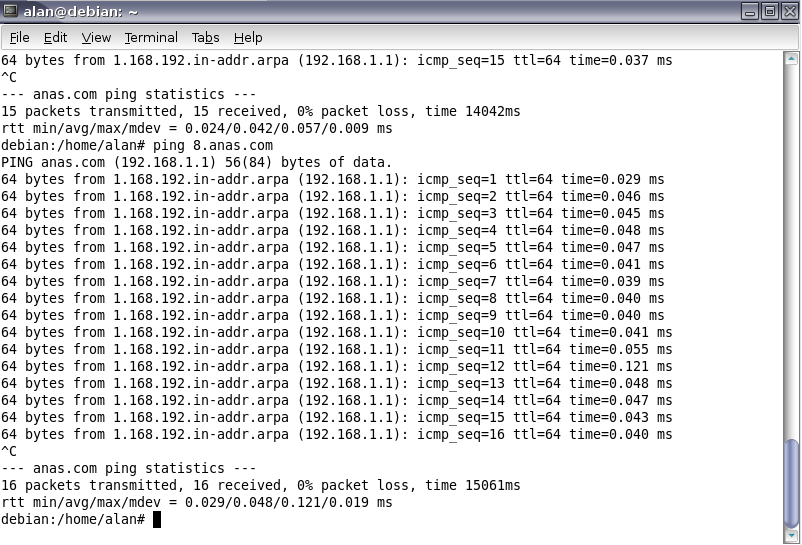
      ping 8.anas.com seperti gambar 10.
      Gambar 10
      Alhamdulillah, sekarang kita telah sukses mengkonfigurasi DNS Server.

    Twitter Delicious Facebook Digg Stumbleupon Favorites More

     
    Design by Free WordPress Themes | Bloggerized by Lasantha - Premium Blogger Themes | GreenGeeks Review